
Authorized Dealer
Communicate clearly with colleagues, co-workers, and friends with the ViewSonic VG2741V 27" 120 Hz Video Conferencing Monitor. With its adjustable 5MP webcam, dual microphones, stereo speakers, and USB 3.2 Gen 1 hub,…
Product highlights and buying context
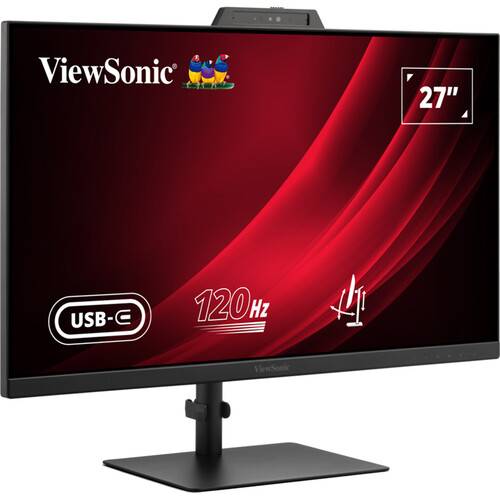
Communicate clearly with colleagues, co-workers, and friends with the ViewSonic VG2741V 27" 120 Hz Video Conferencing Monitor. With its adjustable 5MP webcam, dual microphones, stereo speakers, and USB 3.2 Gen 1 hub, this display helps to deliver quality video chat experiences.
Supporting a 1920 x 1080 Full HD resolution with a 120 Hz refresh rate, the VG2741V delivers crisp visuals with minimal motion blur. In addition to having HDMI and DisplayPort inputs, you can transfer video and data over a single USB-C cable with compatible laptops. The USB-C port also allows you to access an integrated USB 3.2 Gen 1 hub to connect peripherals such as a mouse and keyboard through the monitor and keep your mobile devices charged.
Tilt the built-in webcam 5-degrees in either direction to optimize your video angle.
Windows Hello compatible facial recognition allows you to log in with just a glance.
A slide cover protects your privacy when the camera isn't in use.
The integrated hub includes two USB-A 3.2 Gen 1 ports, which allow you to connect up to 5 Gb/s devices. A front-facing USB-C port provides up to 15W charging.
Experience improved clarity with a fast 120 Hz refresh rate, which reduces screen stutter in fast action scenes.
Tilt the screen 90° in either direction to view documents in portrait mode, then adjust the height, tilt, and swivel to your comfort. The 100 x 100mm VESA mount allows you to attach the display to a wall, swivel arm, or multi-monitor stand. With 178° viewing angles, you can see the screen clearly from almost any position.
Stay comfortable during extended viewing sessions with flicker free and blue light reducing technologies that help to prevent eyestrain and eye fatigue.
ViewSonic's proprietary vDisplay Manager software is available for free and allows users to organize and divide their screen into multiple segments. It also enables users to adjust their monitor settings to their needs for a more efficient workflow.
Additional Details
Loading…
