
Authorized Dealer
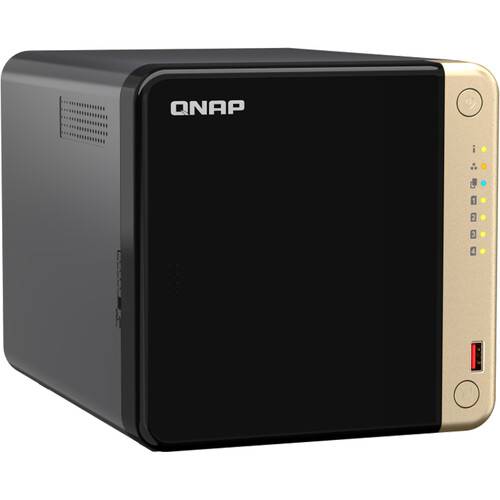
Powered by an Intel Celeron N5095 Quad-Core processor, the TS-464 4-Bay NAS Enclosure from QNAP features two 2.5GbE RJ45 ports and Port Trunking for up to 5 Gb/s combined bandwidth. With M.2 PCIe 3.0 and PCIe 3.0 slots,…
Product highlights and buying context
Powered by an Intel Celeron N5095 Quad-Core processor, the TS-464 4-Bay NAS Enclosure from QNAP features two 2.5GbE RJ45 ports and Port Trunking for up to 5 Gb/s combined bandwidth. With M.2 PCIe 3.0 and PCIe 3.0 slots, the TS-464 provides flexibility in extending NAS functionality, allowing you to install a QM2 card for M.2 SSD caching, or Edge TPU for AI image recognition and various 10GbE/5GbE network cards. The TS-464 comes with 8GB RAM for running light VMs and Containers, and supports multi-cloud backup, cloud storage gateways, 4K HDMI output and real-time transcoding, alongside expandable storage capacity and feature-rich apps to perform as a cost-efficient, reliable 2.5GbE NAS.
This unit has four SATA III 6 Gb/s drive bays, all of which natively support 3.5" hard drives, as well as 2.5" hard drives and SSDs. Should users need to expand the overall capacity of their TS-464, optional expansion units may be connected.
Also featured are two USB-A 3.2 Gen 2 Type-A ports and two USB-A 2.0 ports, which allow it to be connected to external peripherals. Network connectivity is achieved via the two 2.5 Gigabit Ethernet ports with port trunking failover support, which helps to provide redundancy in the case that a LAN connection malfunction occurs on one port.
The TS-464 runs on the QTS hero 5.0.1 operating system. Supported RAID modes include RAID 0, 1, 5, 6, and 10, For those who do not require a RAID, JBOD and Single are also available, allowing each drive bay to be individually utilized.
QNAP has engineered the TS-464 to be energy efficient. Not only does it offer a 120mm cooling fan, the server supports numerous scheduled power on / off cycles and hard-drive hibernation to further minimize power consumption and operation expenses. The TS-464 operates using a 90W AC adapter and includes an Ethernet cable, a power cord, 12 flat head screws for 3.5" HDDs, and 12 flat head screws for 2.5" HDDs. Protection is provided by a limited 3-year hardware warranty.
With increasing availability on switches, motherboards, and laptops, this is the year of 2.5GbE. The 2.5GbE TS-464 NAS is as fast as a single-port 10GbE NAS. By setting port trunking with the two built-in 2.5GbE (2.5G/1G/100M) ports to unleash network potential and increase fault tolerance, TS-464 delivers transfer speeds of up to 589 MB/s.
Processor
2.0 GHz Intel Celeron N5095 Quad-Core processor, burst up to 2.9 GHz.
GPU
Built-in Intel UHD Graphics to speed up video processing and graphical computing.
Memory
8GB of memory.
Encryption Engine
Features Intel AES-NI 256 hardware-accelerated encryption to boost system performance while securing sensitive data.
With a superior hardware design, you can install a dual-port 10GbE network card QXG-10G2TB in the TS-464. Combining 10GbE networking, a quad-core processor, and M.2 SSD caching, the TS-464 unleashes its full performance potential, with reads of up to 1647 MB/s and writes of up to 1632 MB/s.
The TS-464 supports four 3.5" hard drives that can be configured as RAID 5. By connecting a TL-D1600S QNAP storage expansion unit, you can add an additional twelve hard drives to the TS-464 to meet growing storage requirements.
TS-464 has two M.2 PCIe Gen3 slots for installing NVMe SSD or Edge TPU.
Install M.2 NVMe SSDs for Cache Acceleration or Efficient Tiered Storage
If you have a huge number of small files requiring read/write operations, you can easily boost IOPS of TS-464 by configuring its two M.2 SSDs as a cache disk. When transmitting bigger files, you can create a storage pool with two M.2 SSDs. With Qtier automatically moving hot data to SSD and cold data to hard drives, TS-464 allows you to enjoy exceptional application performance.
Accelerate AI-Powered Image Recognition with TPU
By leveraging a Edge TPU to QNAP AI Core (the AI-powered engine for image recognition), the TS-464 can perform high-speed face and object recognition. Edge TPU enables QuMagie to quickly process thousands of photos with high-speed AI Image recognition and classification, and QVR Face to analyze real-time video for instant facial recognition.
QNAP offers a wide range of expansion cards to add versatile functions to your NAS. The TS-464 has one PCIe Gen 3 x2 slot that supports various expansion cards for expanding application potential.
QM2 Card - QM2-2P10G1TB
Add a 10GbE port and two M.2 SSD slots at the same time.
QM2 Card - QM2-2P-344A
Add two M.2 SSDs to create a storage pool with larger capacity caching with the built in M.2 SSDs.
Wi-Fi 6 Adapter
Install a Wi-Fi 6 adapter to turn the TS-464 into a Wi-Fi NAS, allowing accessing NAS data via a wireless network.
TS-464 provides two 10 Gb/s USB 3.2 Gen 2 ports for faster file transfer to/from USB 3.2 Gen 2 devices. The One Touch Copy button also allows you to back up the contents of USB devices to the TS-464 with a single button press.
Taking a lot of photos with your smartphone? Qfile mobile app will help you free up space by automatically backing up photos to the TS-464. With Intel® UHD Graphics, the TS-464 greatly speeds up converting videos to 1080p / 720p, allowing for smooth streaming to mobile devices over varying mobile network speeds.
QNAP's exclusive Virtualization Station enables running multiple Windows/Linux virtual machines. By connecting a keyboard, mouse, and HDMI monitor, you can easily use the TS-464 as a PC.
The TS-464 comes with the QTS 5 operating system as standard, providing a next-generation usage experience with an updated system kernel, optimized user interface, and advanced security features.
Brighter and Smoother
When navigating QTS 5, you will notice a finer attention to detail for a superior browsing experience. Enjoy a smoother NAS experience, comfortable visual design, and find your favorite apps quicker.
Get Started with the Notice Board
When performing first-time installation, the notice board guides you through the setup process. Simply follow the step-by-step instructions for a quick and easy setup.
Smooth and Reactive User Interface
Whether clicking buttons, switching between apps, expanding/collapsing windows - every action is much smoother. The search bar in the main menu also assists in quickly finding desired apps.
Superior hardware performance with an all-in-one Backup Solution to speed up backup/recovery tasks.
PC and Mac Backup
Sync your computer files to NAS with Qsync. The TS-464 also supports Time Machine for Mac computers.
License-Free VM Backup
File Server Backup
Supports multiple protocols such as Rsync, FTP, and CIFS for backing up different file servers.
SaaS Business Backup Solution
Use Boxafe to easily back up Google Workspace and Microsoft 365 business account data.
Google Photos and WordPress Backup
The exclusive MARS service enables backing up Google Photos and WordPress databases and files to NAS.
Back Up Data from One NAS to Another
Back up data on a local NAS to another remote NAS using Hybrid Backup Sync. You can also deduplicate your backup using QuDedup to save time and storage space.
Back Up NAS Data to the Cloud
Hybrid Backup Sync supports mainstream public cloud services for backing up or syncing data from NAS to cloud.
Cloud Storage Gateway
VJBOD Cloud connects cloud object storage (Bucket) and back up data from NAS to the cloud.
Back Up NAS Snapshots
Use Snapshot Replica to back up NAS snapshots to another NAS and recover when needed.
QNAP's exclusive apps provide easy-to-use file storage and collaboration tools. Snapshots also help protect important data from Ransomware.
Volume and LUN Snapshots
"Snapshots" record the complete status of your NAS system and data. Certain data and files can be reverted when needed.
Versioning
Regularly create snapshots. The more snapshots you have, the low
Additional Details
Loading…
