
Authorized Dealer
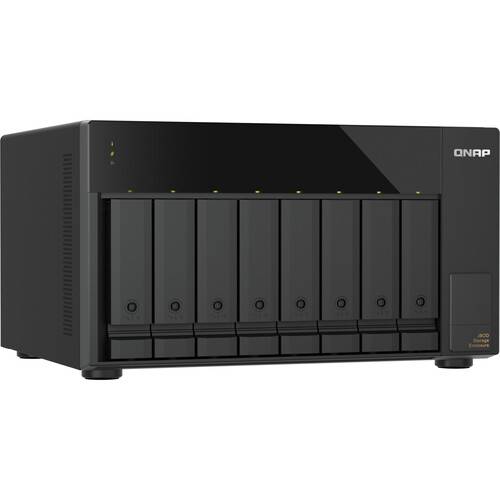
The TL-D810TC4 8-Bay JBOD Expansion Enclosure from QNAP is an expansion solution for creators and personal users with high storage demands, providing high speed access, convenient deployment, and easy management of data…
Product highlights and buying context
The TL-D810TC4 8-Bay JBOD Expansion Enclosure from QNAP is an expansion solution for creators and personal users with high storage demands, providing high speed access, convenient deployment, and easy management of data and backups. It connects to your Windows, Mac, Ubuntu, or NAS host device via plug-and-play using a 40 Gb/s USB4 port. Its eight 2.5"/3.5" drive bays support SATA III 6 Gb/s and SATA II 3 Gb/s drives, which may be set up as a JBOD or software-controlled RAID. If you need to upgrade your storage performance, there is an available PCIe slot which accommodates a QXP-40G2UC expansion card, which provides two additional USB4 ports. Read speeds are supported up to 2997 MB/s, while write speeds max out at 2272 MB/s.
Please note that the TL-D810TC4 is compatible with USB4, Thunderbolt 4, and Thunderbolt 3 only. USB 3 and earlier versions are not supported.
Compatible with QTS 5.2.x/QuTS hero 5.2.8 (or later), Windows 11 (or later), macOS 12.0 (or later), Ubuntu 22.04 (or later), and other systems, the TL-D810TC4 allows flexible storage expansion using its eight 3.5" SATA III drive bays, ensuring both data security and ease of management.
The TL-D810TC4 is equipped with a 40 Gb/s USB4 port that utilizes a USB-C interface, allowing rapid large-file transfers via USB, making it more versatile, efficient, and convenient. Combined with the built-in UASP (USB Attached SCSI Protocol), it significantly improves transfer speeds and reduces data delay and wait times.
Note: To utilize UASP, your computer and OS must support it.
QTS RAID 0
Read speeds up to 2976 MB/s, write speeds up to 2236 MB/s.
QTS RAID 5
Read speeds up to 2977 MB/s, write speeds up to 1802 MB/s.
Windows RAID 0
Read speeds up to 2734 MB/s, write speeds up to 2272 MB/s.
Windows RAID 5
Read speeds up to 2720 MB/s, write speeds up to 717 MB/s.
Ubuntu RAID 0
Read speeds up to 2997 MB/s, write speeds up to 2191 MB/s.
Ubuntu RAID 5
Read speeds up to 2977 MB/s, write speeds up to 1339 MB/s.
With QNAP NAS's Storage & Snapshots Manager, you can easily set up independent RAID groups, create storage pools, monitor S.M.A.R.T. status, and configure notifications to keep track of your hard drive health.
Create an Independent Storage Pool
Using QNAP software RAID, you can create an independent storage pool in TL-D810TC4, supporting RAID migration and disk replacement. Enjoy the same management experience as your NAS's main storage pool.
Note: The TL-D810TC4 can only be used as an independent storage pool or disk area. It cannot be merged with the NAS's main storage pool or disk area, and system applications can only be installed on the NAS itself.
Set as External Disk Mode
Alternatively, use it as an independent storage box (each hard drive is seen as an independent space), providing additional storage space for quick transfer or short-term backup needs, improving efficiency and data security.
Install the QXP-40G2UC expansion card on your NAS and instantly add two USB4 ports with speeds up to 40 Gb/s, upgrading your storage performance across the board.
USB4 JBOD can be directly connected to a QNAP NAS TVS-AIh1688ATX with the USB4 port without any complicated network setup - just plug and play to expand storage capacity. It supports high speed transfers and hot-swapping, making it an ideal choice for enhancing NAS storage flexibility.
Build a Large Capacity Dedicated Database
Whether it's large files, 4K videos, or work materials, you can easily store them, freeing up space on your local storage.
Software RAID Setup
Use the built-in tools in your system (Windows Storage Spaces) to combine multiple hard drives into a software RAID, improving data security or read/write performance as needed.
Note: Due to platform incompatibilities, once configured in software RAID mode, the storage cannot be used across different platforms.
Single Disk Mode
Each hard drive can be read and written independently, like a large multi-bay hard drive system. When one disk is full, you can remove it and replace it with a new one. You can also reinsert a disk with existing data to access its contents, ideal for large data batch storage and archiving.
Windows users can monitor or set up the system and disk status of their TL-D810TC4 via QNAP JBOD Manager, including checking device health and fan speed. The system will record all events within the device, and when an abnormal condition occurs, real-time desktop notifications will be provided to keep you informed.
1. Mac users can manage TL-D810TC4 using the latest JBOD Manager v1.3.
2. Windows users can easily manage TL-D810TC4 with the latest JBOD Manager v1.3.
3. Linux users can easily manage TL-D810TC4 with the latest JBOD Manager v1.1.
When transferring large files or a single large dataset, network transfers can be time consuming and bandwidth heavy, often taking days to complete and impacting productivity. With the TL-D810TC4, you can perform remote data migration by simply installing the hard drives, setting up a software RAID, and then shipping the entire unit to the target location. Once connected to a NAS or PC, it's plug-and-play, enabling rapid large-file migration.
Note: If a software RAID is configured, TL-D810TC4 data migration only supports use on another host with the same system.
The compact desktop design of the TL-D810TC4, combined with excellent ventilation structure and fan cooling, is ideal for long-term desktop operation, maintaining high efficiency and stable performance continuously.
When the main device powers on or off, JBOD automatically synchronizes, improving system stability and reducing operational risks.
With the included drive slot keys, you can lock each hard drive slot, preventing removal of drives and ensuring the physical safety of your data.
Additional Details
Loading…
