Authorized Dealer
Improve the audio quality in your meetings and conferences with the Polsen USB Boundary Microphone with Headphone Output, a tabletop USB boundary microphone featuring a 3.5mm headphone jack with volume control for…
Product highlights and buying context
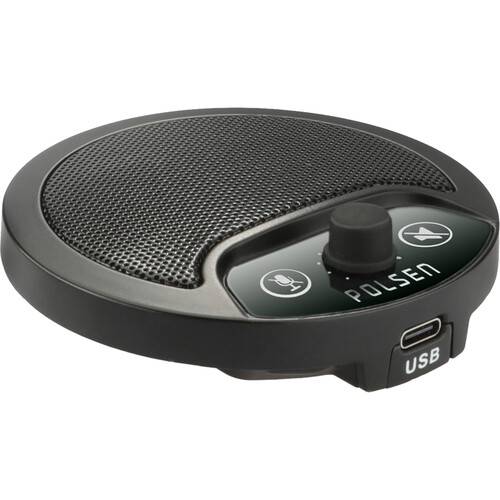
Improve the audio quality in your meetings and conferences with the Polsen USB Boundary Microphone with Headphone Output, a tabletop USB boundary microphone featuring a 3.5mm headphone jack with volume control for monitoring. A noticeable improvement over your computer's built-in microphone, the mic's omnidirectional pickup pattern captures audio in a 360° radius, ensuring you can sit comfortably and be clearly heard without having to talk directly into a microphone. The mic features plug-and-play operation; simply place it on your desk or conference table, plug it into your computer's USB port, and it's ready to use—with no additional software or drivers required.
Power is supplied by your computer's USB port and the internal analog to digital converter converts the analog microphone audio to a 24-bit / 48 kHz digital signal for streaming and recording. A touch-sensitive microphone mute switch lets you quickly cut the mic if you need a private moment during your meeting, while a second switch silences the headphone output.
You've probably experienced dropouts, feedback, and poor audio quality with your computer's internal microphone—and at the worst possible moments. The USB Boundary Microphone captures reliable sound for conferences and video meetings for you and any participants sitting around the microphone.
The microphone features an omnidirectional polar pattern that uniformly picks up sound 360 degrees around the microphone. You can sit comfortably at your desk, look around if you like, and not focus on speaking directly into the microphone. Set it in the center of a table, and all participants seated around it will be clearly heard.
The mic has an internal A/D converter so no additional audio gear, like an A/D interface, is necessary to use it. It provides clear, accurate audio at a sample rate of 24-bit / 48 kHz, which is better than CD quality.
For monitoring, simply plug your favorite headphones into the standard 3.5mm headphone jack. An easy-to-access knob controls the volume level.
Some people call them mutes. Some people call them panic buttons. Whatever you call them, the touch-sensitive mute switches give you control over the incoming and outgoing audio. When you need to mute the microphone to have a side conversation, use the microphone mute. A second mute switch mutes the audio from the headphone jack. Both mute switches operate silently, so the other participants won't know you're muting and unmuting your mic or headphones.
Plug the mic into an available USB port on your desktop or laptop computer, and you're ready to go. You won't need to wait for software to download to start using the microphone.
The microphone is bus powered, so you don't need to connect a power cable or install batteries. Attach the mic to your computer with the included cable, and you're ready to go.
This boundary mic's all-metal construction is made for repeated use in demanding conference room and office environments. It's also solid enough to take with you when you're on the go, and it will withstand bumps when you pack it into your computer case.
Additional Details
Loading…
