
Authorized Dealer
Expand your workspace with up to four 4K UHD displays with the OWC USB-C Quad HDMI 4K Display Adapter. All you need is a single USB-C port on your Mac, PC, or Chromebook to create a dramatically immersive viewing…
Product highlights and buying context
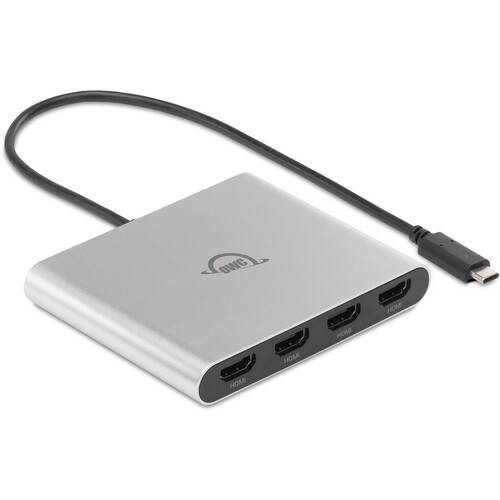
Expand your workspace with up to four 4K UHD displays with the OWC USB-C Quad HDMI 4K Display Adapter. All you need is a single USB-C port on your Mac, PC, or Chromebook to create a dramatically immersive viewing experience. The adapter is bus-powered via its 11.8" integrated USB-C cable. You can also connect a USB-C power adapter to pass through up to 90W of power to your computer to keep it charged while still outputting to your HDMI monitors.
Thanks to universal USB-C compatibility, you can use this adapter with Macs, PCs, and Chromebooks. Whether your computer uses Thunderbolt 3, 4, or 5, USB4, or standard USB-C, this high-performance adapter eliminates the hassle of worrying about ports, cables, or connection types.
Whether you need portable simplicity or full power at your desk, the adapter offers you the power of choice. Bus-powered, it can be used via its 11.8" integrated USB-C cable. Or connect a USB-C power adapter to pass through up to 90W of power to your computer to keep it charged while still driving your HDMI displays.
Adding up to four monitors to your computer is very simple, thanks to this adapter. Simply connect this adapter to your PC and HDMI-compatible displays. Then download the DisplayLink Manager app (Mac) or driver (Windows) and start multitasking with ease.
Discover another level of efficiency by easily managing video calls, spreadsheets, project management tools, and research tabs across four gloriously sharp screens. Instead of constant window switching or losing focus, you can now power through tasks faster, stay connected with your team, and create a workflow that feels as seamless as it is productive.
Whether you're a graphic designer, video editor, or animator, your creativity and productivity thrive with the right tools. With up to four displays, you can dedicate one to editing tools, another to a full-screen preview, and the others to libraries or timelines. Now you can dive into complex projects without constantly minimizing windows or stopping your storytelling process.
Working with extensive lines of code and monitoring multiple streams of data simultaneously requires serious screen space. Rotate your display to a portrait orientation to see more code at once, reduce tedious scrolling, and make pattern recognition easier. Now you can have your code editor on one screen, output and debugging tools on another, and documentation or reference materials on the two additional screens. Not only will you streamline your coding process, but you'll reduce errors and improve code quality.
Every second counts in your fast-paced world. You rely heavily on multiple monitors to track real-time data, financial news, and market trends across various platforms. With four screens displaying critical information, you can make informed decisions swiftly and capitalize on market movements that benefit your clients as they happen. If you're a day trader, four displays are an absolute must to observe numerous stocks, analyze charts, and execute trades simultaneously.
Additional Details
Loading…
