Authorized Dealer
The Duex Float 2 Pro 16" 1600p Portable Monitor from Mobile Pixels is a thin and light portable display that helps get things done more efficiently when you're on the go. It features a WQXGA 2560 x 1600 resolution and…
Product highlights and buying context
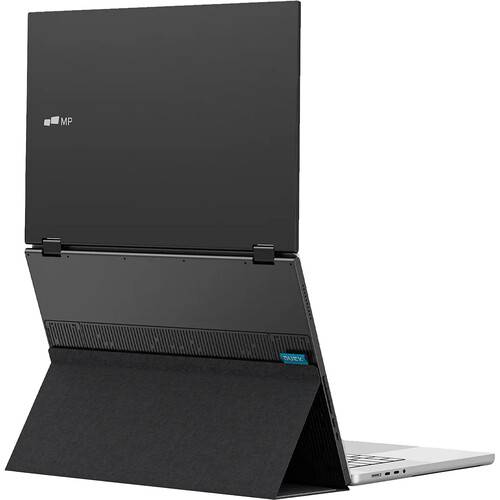
The Duex Float 2 Pro 16" 1600p Portable Monitor from Mobile Pixels is a thin and light portable display that helps get things done more efficiently when you're on the go. It features a WQXGA 2560 x 1600 resolution and offers a few different use modes. Use it as a secondary monitor for an extended or mirrored setup, or flip the screen and share content with someone in front of you. A third option is to use the integrated kickstand to create an independent display. Using four included magnets, you can also attach the Float 2 Pro to your laptop.
This display features anti-glare LCD panel technology, a widescreen 16:10 aspect ratio, 350 nits of brightness, a 1200:1 contrast ratio, coverage for 100% of the sRGB and 72% of the NTSC color gamuts, and an 8 ms response time. Thanks to a 120 Hz refresh rate, the display refreshes 120 times per second for smooth motion. Connectivity is achieved using two USB-C ports, which provide video via DP Alt mode and up to 65W of power. Or use the mini-HDMI port for video, while the USB-C port provides power, and audio may be output using dual speakers. In addition to protecting the front and back of the display from scratches, an included magnetic cover also unfolds into a stand, while two integrated grooves let users choose their desired viewing angle.
Please note that to use this monitor solely via USB-C, your device's USB-C port must support DP Alt mode. Otherwise, use USB-C for power and mini-HDMI for video.
Mobile Pixels has taken everything you loved about the Duex Float 2 Pro and made it even better. The Duex Float 2 Pro isn't just a second screen, but a productivity powerhouse that fits into your workflow. This 16" 2650 x 1600 display is 0.7" thin and lightweight at 2.9 lb allowing it to be easily packed and transported wherever you go. Using a USB-C cable, it can quickly and easily be set up for both video and power.
Use it as your secondary monitor as an extended display or mirrored display. Achieve a healthy ergonomic alignment while working on the go.
You can also flip the screen and easily share content with someone in front of you, such as a presentation to your team at work.
Use the built-in kickstand and turn the Duex Float 2 Pro into an independent display, making it perfect for gaming or viewing documents.
Mobile Pixels redesigned the integrated kickstand of the Duex Float 2 Pro, allowing it to both support this display and serve as a protective screen. The integrated kickstand also allows you to use this display without magnetically attaching it to your laptop using four included magnets.
Set up the Duex Float 2 Pro with Windows and macOS laptops using a single USB-C cable that transmits both video and power for efficient plug-and-play and quick transitions. If your laptop doesn't have a USB-C port or has one without DP Alt mode, you can also use the HDMI cable for video. No software is required.
Extend your smartphone's screen with USB-C connectivity. This works with the iPhone 15 and newer or devices that support Samsung DeX.
Engineered with dual integrated speakers, the Duex Float 2 Pro blends outstanding screen performance with stereo sound for an immersive multimedia experience.
The anti-glare screen minimizes reflections, which can cause eye strain and fatigue when viewing screens for long periods. Also, the reduced glare and improved visibility contribute to a more comfortable and enjoyable viewing experience, whether you're watching movies, playing games, or working on tasks.
Additional Details
Loading…
