
Authorized Dealer
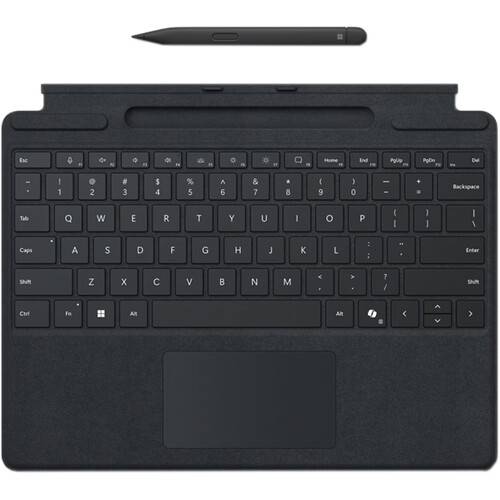
Enhancing your productivity with versatility, Microsoft Surface Pro Keyboard with Slim Pen for Business allows you to quickly switch from typing to drawing illustrations and notes by hand. Designed with elegant black…
Product highlights and buying context
Enhancing your productivity with versatility, Microsoft Surface Pro Keyboard with Slim Pen for Business allows you to quickly switch from typing to drawing illustrations and notes by hand.
Designed with elegant black colored Alcantara fabric, the Microsoft Surface Pro Keyboard for Business with Pen Storage attaches magnetically to your compatible Surface Pro to provide a smooth and comfortable laptop-like typing experience. This mechanical keyboard cover device also enhances your productivity with a dedicated Microsoft Copilot key, integrated shortcut keys, and a built-in glass touchpad. A convenient storage tray keeps your separately purchased Surface Slim Pen for Business nearby while providing easy recharging.
Sleek and compact, this keyboard performs like a traditional laptop keyboard, complete with full mechanical keyset, backlit keys, and large glass touchpad for precise control and navigation.
Work your way anywhere. This keyboard clicks into place instantly and stays securely attached so you always have your keyboard and pen with you.
Sketch and write naturally on the screen and enjoy no-fuss pairing with Surface Slim Pen for Business always ready and charged in the keyboard's storage tray.
Draw, sketch, and take handwritten notes with the natural feel of pen and paper with the Surface Slim Pen 2 from Microsoft. Designed to work with the Surface Laptop Studio, Surface Pro, Surface Hub 3, and others, this wireless digital pen features a sharp pen tip and an improved design that delivers pinpoint accuracy and exceptional shading with 4096 levels of pressure sensitivity and digital ink that flows as soon as the tip touches the screen. With its integrated haptic motor, you get the feel of putting pen to paper when working from a digital screen using apps such as Microsoft Teams and Microsoft Whiteboard. The Slim Pen 2 also has a side button and a top button with eraser functionality that help to enhance your workflow. Additionally, its 15-hour battery can be recharged wirelessly, and the pen is designed to be stored securely onto a separately purchased Surface Pro Signature Keyboard or Surface Laptop Studio. The Surface Slim Pen 2 pairs with your device using Bluetooth 5.0 technology.
The integrated haptic motor delivers tactile signals as you write and draw, letting you know when you've completed gestures like circling text to select and crossing things out to delete in applications such as Microsoft Word and Excel. You can customize the strength of the tactile feedback to fit your preferences.
Enjoy smooth writing and drawing experiences by using the built-in eraser to quickly get rid of unwanted lines and text as you would with a traditional pencil.
Additional Details
Loading…
