
Authorized Dealer
Enhance your productivity by outfitting your office or home with the Lenovo ThinkCentre M90t Gen 6 Desktop Workstation. Equipped with an Intel Core Ultra 9 285 24-Core Series 2 vPro processor with 16GB of DDR5 memory…
Product highlights and buying context
Enhance your productivity by outfitting your office or home with the Lenovo ThinkCentre M90t Gen 6 Desktop Workstation. Equipped with an Intel Core Ultra 9 285 24-Core Series 2 vPro processor with 16GB of DDR5 memory and a 256GB M.2 PCIe 4.0 SSD, this system is designed to take on challenging AI workloads while giving you room to expand.
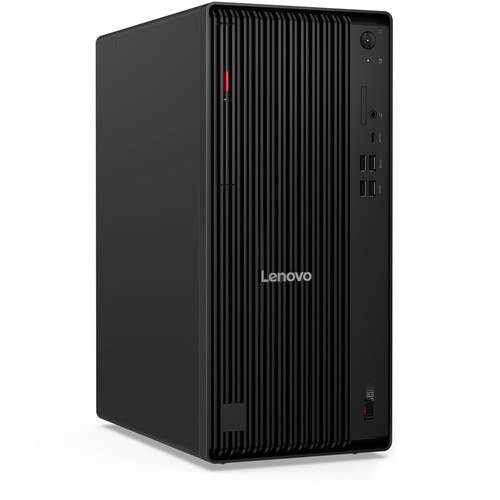
The USB-C 3.2 Gen 2x2 port on the front panel provides up to 20 Gb/s data transfers and 15W charging with compatible devices. It is accompanied by two USB-A 3.2 Gen 2 ports that can transfer up to 10 Gb/s. Two front and four rear 5 Gb/s USB-A 3.2 Gen 1 ports and two rear USB-A 2.0 ports support peripherals such as the included mouse and keyboard. There is also a DVD±RW optical drive. Wi-Fi 6E support and a Gigabit Ethernet port allows you to connect to compatible networks. Powered by integrated Intel Graphics, you can connect displays to the HDMI and three DisplayPort ports. Windows 11 Pro is preinstalled.
The Intel Core Ultra 9 285 processor powers applications with eight Performance cores while the 16 Efficient cores handle background tasks. The processor features a 5.5 GHz Max Turbo 3.0 frequency.
An integrated NPU accelerates AI workloads with 13 TOPS.
Featuring a spacious chassis, the ThinkCentre M90t Gen 6 includes four DDR5 UDIMM memory slots, two 3.5" drive bays, one 2.5" drive bay, and three M.2 SSD slots. There is also a PCIe 5.0 x16 slot, a PCIe 40 x16 (x4) slot, and two PCIe 3.0 x1 slots. The desktop already comes with an optical drive.
The Intel vPro platform delivers built-in features for performance, security, manageability, and stability. Get business-class performance and power productivity right out of the box. Intel vPro also provides hardware-enhanced security features with technologies to help protect against cyberthreats, plus platform stability. Additional features, such as remote management with Intel Active Management Technology, require activation and IT administration.
Microsoft simplified the design and user experience with Windows 11. It has a modern, clean design with a new Start Menu position. Snap Layouts, Groups, and Desktops allow you to multitask with ease. Microsoft has also integrated some of their apps, such as Microsoft Teams. The redesigned Microsoft Store makes it easier to look for supported apps. The Pro version of Windows 11 includes all the features that Windows 11 Home offers plus many designed specifically for business users, including Hyper-V virtualization, BitLocker disk encryption, and remote desktop access.
Additional Details
Loading…
