
Authorized Dealer
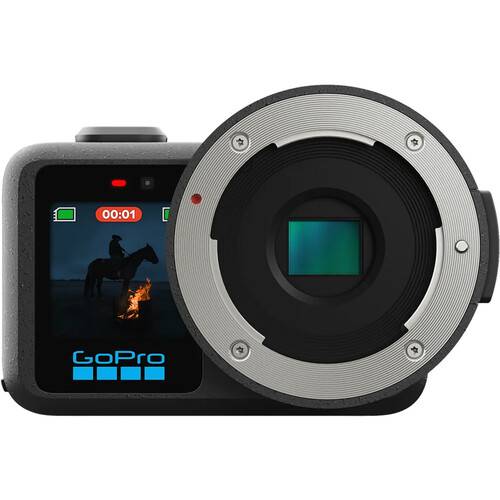
Taking cine characteristics and squeezing them into an action camera form factor, the GoPro MISSION 1 PRO ILS features an MFT lens mount, a 50MP 1" image sensor, and a GP3 processor to easily capture up to 8K30 and…
Product highlights and buying context
Taking cine characteristics and squeezing them into an action camera form factor, the GoPro MISSION 1 PRO ILS features an MFT lens mount, a 50MP 1" image sensor, and a GP3 processor to easily capture up to 8K30 and 4K120 Open Gate video. Dedicated low-light capture and a wide 14-stop dynamic range make for efficient image capture in any environment. A 159° field of view and enhanced zooming modes ensure you don't miss any of the action. Swap between different Micro Four Thirds mount lenses for flexibility on set. Other updates include improved battery life and thermal performance for increased dependability.
When using lenses weighing more than 8.8 oz (250 g) it is highly recommended to use a lens support.
The MISSION 1 series easily captures Open Gate footage, a taller 4:3 video frame than other capture modes. Open Gate is available in both 8K30 and 4K120 resolutions for more flexibility in editing, reframing, and content delivery.
The MISSION 1 series HyperSmooth protocol features fine-tuned performance for action sports and underwater activities. AutoBost adjusts your shot based on speed and movement, while Horizon Lock keeps your footage level even when rotating a full 360°.
Four built-in microphones easily capture stereo 32-bit float audio and adjust for unforeseen disturbances using wind noise reduction. Additional automatic gain control allows for precise limiting. Connect a USB-C or wireless audio device using the onboard port or via Bluetooth in tandem with the GoPro Wireless Mic Transmitter.
Slow motion has received a huge boost with the MISSION 1 series. Choose between 4K240 for 8x slow motion, 1440p480 for 16x slow motion, or even 1080p960 for Burst Slo-Mo capturing 10 seconds of up to 32x.
Easy-to-use tools allow you to edit your footage, tweak automatically generated highlight videos, or make your own videos from scratch. Change digital lenses after recording, zoom in on the best frames, and create thumbnails for your next social media post or YouTube video. Wirelessly upload video to your Quik app without needing to use the USB-C connection on the camera. Create presets of your go-to settings for easy recall.
Additional Details
Loading…
