Authorized Dealer
Designed primarily for enthusiasts, gamers, and professionals, the GEEKOM A8 Max Mini Desktop Computer features a compact design that houses a 3.8 GHz AMD Ryzen 7 8745HS 8-Core processor with 16GB of DDR5 memory and a…
Product highlights and buying context
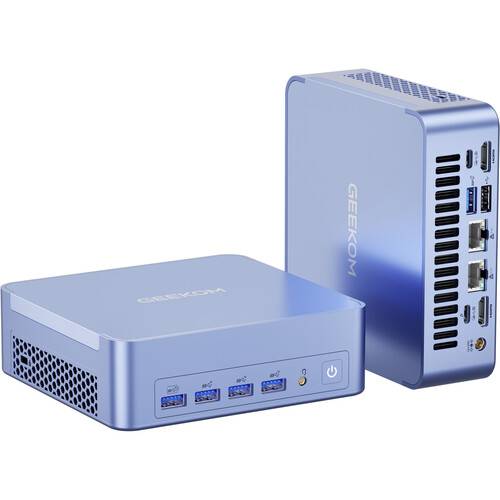
Designed primarily for enthusiasts, gamers, and professionals, the GEEKOM A8 Max Mini Desktop Computer features a compact design that houses a 3.8 GHz AMD Ryzen 7 8745HS 8-Core processor with 16GB of DDR5 memory and a 1TB M.2 NVMe PCIe 4.0 SSD that allows you to smoothly load and multitask applications.
The USB4 port allows you to transfer up to 40 Gb/s and 100W power with compatible devices. There are also three USB-A 3.2 Gen 2 ports that work with 10 Gb/s devices. You can enhance your workflow by connecting up to four 4K monitors through the USB4, USB-C, and HDMI 2.0 ports. Or you can link a single 8K display through the USB4 or USB-C ports. The USB-A 2.0 port may be reserved for peripherals such as a separately purchased wireless keyboard and mouse adapter. Wi-Fi 6E (802.11ax) support and dual 2.5 Gb/s Ethernet ports let you connect to compatible network devices for smooth video streaming and low-latency gaming. Windows 11 Pro is preinstalled.
The AMD Ryzen 7 8745HS 8-Core processor has a 3.8 GHz base speed and can be boosted to 4.9 GHz. Integrated AMD Radeon Graphics 780M provides rich visuals.
With its space-saving design and included VESA mount, you can place this mini PC almost anywhere, including behind a monitor, underneath a desk, or on a wall. You can even take this mini PC on the go.
Two dual-channel DDR5-5600 SO-DIMM slots are available, supporting up to 64GB. For storage, there is an up to 2TB M.2 2280 PCIe 4.0 x4 slot.
The IceBlast 2.0 cooling system features air outlets on both sides to effectively dissipate heat from critical components such as the CPU, memory, and SSD.
Dual network ports enable data storage sharing on the intranet and remote access on the extranet. The extranet cannot invade the intranet, which helps to ensure data privacy and security.
Microsoft simplified the design and user experience with Windows 11. It has a modern, clean design with a new Start Menu position. Snap Layouts, Groups, and Desktops allow you to multitask with ease. Microsoft has also integrated some of their apps, such as Microsoft Teams. The redesigned Microsoft Store makes it easier to look for supported apps. The Pro version of Windows 11 includes all the features that Windows 11 Home offers plus many designed specifically for business users, including Hyper-V virtualization, BitLocker disk encryption, and remote desktop access.
Additional Details
Loading…