Authorized Dealer
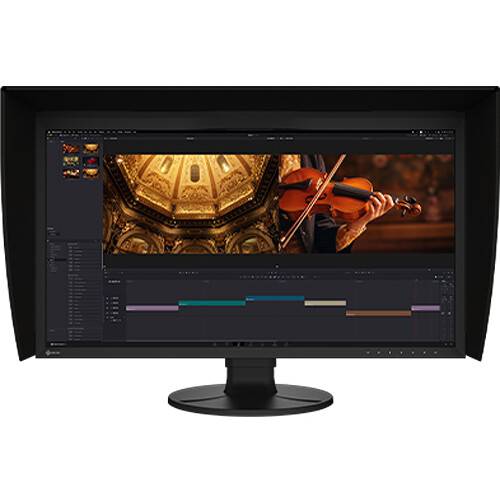
Designed primarily for creative professionals, the ColorEdge CG3100X 30.5" DCI 4K HDR Monitor from EIZO delivers lifelike color accuracy that covers 99% of the DCI-P3 and 97% of the Adobe RGB gamut. It also features a…
Product highlights and buying context
Designed primarily for creative professionals, the ColorEdge CG3100X 30.5" DCI 4K HDR Monitor from EIZO delivers lifelike color accuracy that covers 99% of the DCI-P3 and 97% of the Adobe RGB gamut. It also features a built-in color calibration sensor with support for a 12-bit 3D LUT and HDR that helps ensure that you're ready for each project.
Supporting a DCI 4K 4096 x 2160 resolution with a 17:9 aspect ratio, this display delivers crisp details with more horizontal viewing space than UHD monitors. Connecting a compatible laptop to the USB-C port allows you to transfer video, data, and up to 94W power over a single cable. There is also an HDMI port available alongside a DisplayPort input. A built-in USB hub and Gigabit RJ45 port help to enhance your productivity. The included monitor hood helps to block glare from ambient lighting.
The CG3100X offers exceptional visual performance with a 500-nit brightness level and 1800:1 contrast ratio. For HDR content, the monitor supports the gamma (EOTF) compatible hybrid log-gamma (HLG) transfer function for broadcasting and perceptual quantization (PQ) curve for production of films and streamed content. Users can set any camera log using the ColorNavigator software.
The monitor offers 10-bit simultaneous display from a 24-bit look-up-table (LUT), which means it can show 1.07 billion colors simultaneously.
This display is equipped with a 3D look-up table, which adjusts colors on an RGB cubic table. Use ColorNavigator's film emulation function to emulate film color properties using a 3D LUT file.
A built-in sensor can be set to calibrate the monitor automatically at designated times to ensure that your screen stays color-accurate. The sensor swings onto the screen, taking up minimal space and allowing you to continue working even during calibration.
The CG3100X features a headphone jack for checking audio content.
Pixel Inspection, operated through the monitor's OSD, shows the color information of a pixel from the source input data and the data as it is displayed on the monitor.
An optional PQ gamma curve (EOTF) function allows the input signal to be clipped or compressed to fit within the luminance value of the monitor. This allows users to simulate how the signal will appear in other display environments. The Auto setting under PQ Option menu automatically adjusts the PQ curve according to the monitor's current brightness.
The Nearest Neighbor Interpolation setting is an option for image scaling and resampling. When upscaling, Nearest Neighbor copies and aligns pixels to the closest adjacent position while maintaining color fidelity. When Nearest Neighbor is turned off, the monitor uses an interpolation method that balances gradation of the surrounding pixels for smooth color tone.
The PQ Option function allows you to check PQ content at any brightness level and shows the areas of the image that are clipped when displayed at a specified brightness level. These areas are marked in yellow or magenta to easily distinguish them.
The 4K zoom function allows users to enlarge areas of the screen to check fine details and accuracy of the focus in the scene.
A Gamut Warning mode indicates areas of a BT.2020 image that cannot be reproduced in the BT.709 color space, which is the standard for Full HD broadcasts. An additional mode called BT.709 Clipping allows the editor to view BT.2020 images within the BT.709 color space, simulating how it would look on an HDTV.
A marker function ensures that content, such as text or graphics, is properly positioned on the screen. The Safe Area Marker marks an area of the screen within which captions or other information will appear to ensure they are visible during broadcast.
Additional Details
Loading…