Authorized Dealer
Designed primarily for professional video editing and previewing, the EIZO ColorEdge CG2400SV 24.1" Full HD+ HDR Monitor delivers accurate color and 3G-SDI connectivity. With a built-in color calibrator, 98% DCI-P3…
Product highlights and buying context
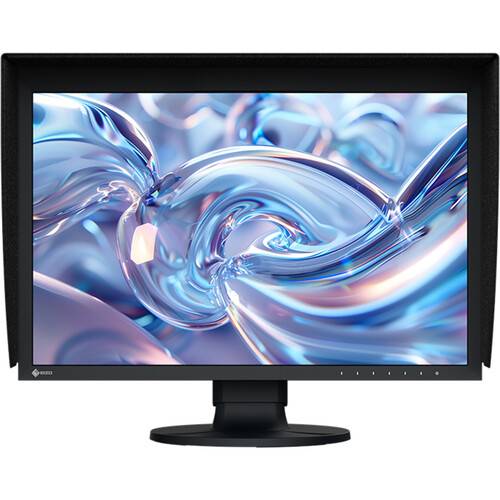
Designed primarily for professional video editing and previewing, the EIZO ColorEdge CG2400SV 24.1" Full HD+ HDR Monitor delivers accurate color and 3G-SDI connectivity. With a built-in color calibrator, 98% DCI-P3 coverage, and 3D LUT support, this 1920 x 1200 resolution display is ready to help bring your creative visions to life.
With SDI input and output terminals that support 3G-SDI signals, you can transfer full uncompressed video with full HDR fidelity with compatible devices, making this display ideal for live video feeds and accurate monitoring. HDMI and DisplayPort inputs are also available. Use the built-in USB hub to connect flash drives, keyboards, mice, and other peripherals through the monitor. Connect a pair of headphones to the 3.5mm jack for audio monitoring. The included display hood helps block out distracting light so you can find the perfect look.
A 1920 x 1200 resolution and 16:10 aspect ratio offers more vertical viewing space than traditional Full HD displays, which can reduce the amount of scrolling.
The 24.1" IPS panel provides 10-bit color with 98% DCI-P3, 97% Adobe RGB coverage, and a 16-bit LUT. HLG and PQ high-dynamic range support provide sharp contrast with an 1800:1 static contrast ratio and 400 nits brightness.
This monitor is equipped with a 3D LUT (look-up table) which adjusts colors on an RGB cubic table. Using ColorNavigator 7's film emulation function users can emulate film color properties from a 3D LUT file.
Two 5 GB/s compatible USB-A 3.2 Gen 1 ports and two USB-A 2.0 ports are located on the side of the monitor for easy accessibility. A built-in KVM allows you to control multiple devices with a single mouse and keyboard connected through the monitor.
The built-in sensor can be set to calibrate the monitor automatically at designated times. This eliminates the need for a third-party calibration device and ensures your screen stays color accurate. In addition, the sensor swings onto the screen, taking up minimal space and allowing you to continue working even during calibration.
A monitor needs to be calibrated at regular intervals to maintain color accuracy. EIZO's proprietary ColorNavigator 7 software provides an intuitive and precise solution to color management. It allows you to schedule automatic recalibration, calibrate all color modes simultaneously, and conduct correlation with external sensors to match the studio's internal color management framework.
The CG2400S offers preset modes for DCI-P3, BT.709, and BT.2020 to ensure you can work in the appropriate color spaces and gamma values. Additionally, preset modes for PQ (DCI and BT.2100) and HLG (BT.2100) are available for viewing HDR content. With the monitor's built-in calibration sensor, you can adjust or maintain the brightness setting for each preset.
Support for HLG (hybrid log-gamma) and the PQ (perceptual quantization) curve allows for displaying and editing HDR (high dynamic range) video content. The optimized gamma curves render images to appear more true to how the human eye perceives the real world compared to SDR (standard dynamic range). This ensures professional creators can reliably display HDR content for editing and color grading.
In compliance with the DCI standard, the monitor offers a high contrast ratio of 1800:1 for producing true blacks that are otherwise difficult to display on a typical LCD monitor. CG Series monitors are also equipped with a retardation film which allows tones to retain their depth, even when viewed from an angle.
The monitor's Sync Signal function automatically switches the color settings such as brightness, gamma (EOTF), and color gamut according to the metadata of the input signal. This eliminates the need to manually switch color settings when working on multiple projects.
An optional PQ gamma curve function allows the input signal to be clipped or compressed to fit within the luminance value of the monitor. This allows users to simulate how the signal will appear in other display environments.
The PQ Option function allows you to check PQ content at any brightness level and shows the areas of the image that are clipped when displayed at a specified brightness level. These areas are marked in yellow or magenta to easily distinguish them within the image.
The monitor includes a Gamut Warning preset that, when selected, indicates areas of a BT.2020 image that cannot be reproduced using BT.709 by converting them to shades of gray. An additional mode called BT.709 Clipping allows the editor to view BT.2020 images within the BT.709 color space, simulating how it would look to their audience in an HDTV environment.
Working within the wrong parameters affects editing decisions, potentially requiring significant rework of projects and causing costly delays in production schedules. Pixel Inspection, operated through the monitor's OSD, shows the color information of a pixel from the source input data and the data as it is displayed on the monitor.
A marker function ensures that content, such as text or graphics, is properly positioned on the screen. The Safe Area Marker marks an area of the screen within which captions or other information will appear to ensure they are visible during broadcast. The position and size of the markers can be specified to suit the current project.
The gamma level for each ColorEdge monitor is adjusted at the factory by measuring the R, G, and B gamma values from 0 to 255, then using the monitor's 16-bit look-up-table (LUT) to select the 256 most appropriate tones and achieve the desired value. This ensures the smoothest color gradations in your images.
LCD monitors commonly exhibit fluctuations in brightness and chromaticity across the screen, affecting color accuracy. To counter this, ColorEdge monitors are equipped with EIZO's patented digital uniformity equalizer (DUE) technology which corrects deviations in every tone across the screen to ensure a stable display.
The color and brightness of an LCD monitor can shift due to changes in ambient temperature and the temperature of the monitor itself. ColorEdge CG Series monitors are equipped with a temperature sensor for accurately measuring the temperature inside the monitor as well as estimating the temperature of the surrounding environment. With this temperature sensing and estimation technology, the monitor adjusts in real-time so that gradations, color, brightness, and other characteristics continue to be displayed accurately. Furthermore, EIZO uses AI in its estimation algorithm to distinguish between various temperature-changing patterns to calculate even more accurate corrections.
A typical monitor takes 30 minutes or more for its brightness, chromaticity, and tone characteristics to stabilize. The ColorEdge CG2400S takes a mere three minutes after turning the monitor on.
The ColorEdge CG2400S comes bundled with a light shielding hood that effectively prevents glare on the screen caused by ambient lighting. The hood is newly designed to be lightweight and easily attaches to the monitor magnetically without needing to connect separate parts.
Adjust the screen to a more comfortable angle and reposition it to show your work to a colleague or client. This monitor included stand offers height, tilt, and swivel adjustments. The stand is also equipped with a quick release that allows you to easily remove the screen from the stand with a single touch.
Additional Details
Loading…