Authorized Dealer
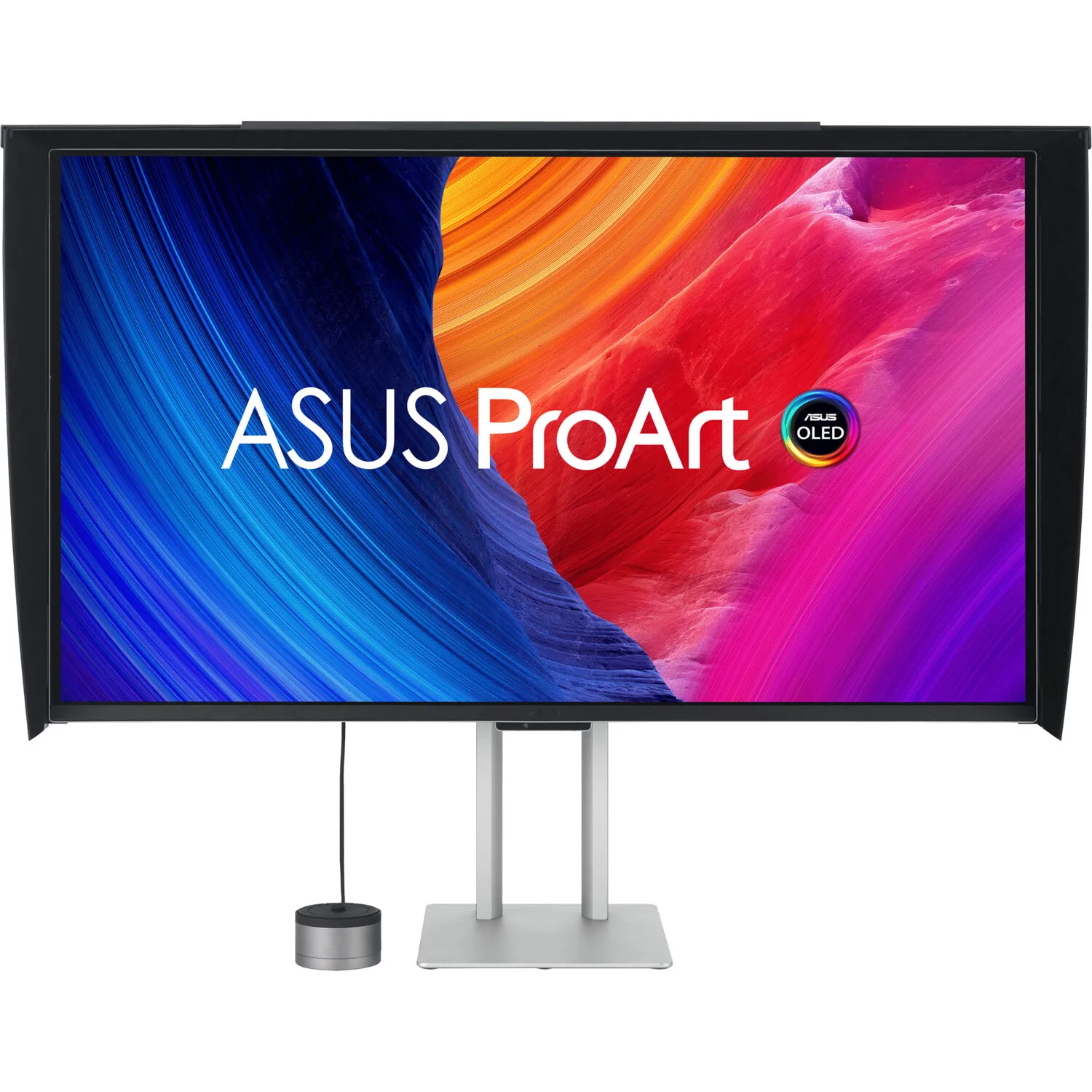
Streamline your professional photography, video editing, and color workflow with the ASUS ProArt OLED PA32UCDMR-K 31.5" 4K HDR 240 Hz Monitor. Designed to deliver exceptional 10-bit color, this Calman-ready 3840 x 2160…
Product highlights and buying context
Streamline your professional photography, video editing, and color workflow with the ASUS ProArt OLED PA32UCDMR-K 31.5" 4K HDR 240 Hz Monitor. Designed to deliver exceptional 10-bit color, this Calman-ready 3840 x 2160 resolution 4K UHD monitor's OLED panel is factory calibrated for ΔE <1 accuracy, covering 99% of the DCI-P3 and 100% sRGB gamut. It also supports HDR10, HLG, and Dolby Vision high-dynamic range formats with a 1.5 million:1 static contrast ratio, allowing you to tailor content to multiple regions. The included ProArt CaliContrO 3-in-1 hardware calibrator helps to ensure color accuracy while enhancing your workflow.
With Thunderbolt 4 connectivity, you can transfer video, data, and 96W of power over a single cable with compatible laptops. The second Thunderbolt 4 port lets you daisy chain an additional display or other devices. An HDMI 2.1 port is also available alongside a DisplayPort 1.4 input. The USB-A and USB-C 3.2 Gen 2 ports allow you to connect up to 10 Gb/s compatible peripherals to your system through the monitor. A monitor hood is included to help reduce reflections. This OLED display features a 3-year warranty and covers burn-in.
The 31.5" OLED panel delivers true 10-bit color, factory calibrated for Delta E <1 accuracy, covering 99% of the DCI-P3 and 100% Adobe RGB gamut. It also has a 0.1 ms GtG response time with a 1.5 million:1 static contrast ratio and 1000 nits peak brightness in HDR mode for realistically deep shadows and bright highlights.
A 240 Hz refresh rate and variable-refresh-rate (VRR) technology allows creators to work on fast-rendering visuals and conduct quality checks-all on a single display. The HDMI 2.1 input delivers smooth visuals with 4K, 240 Hz displays.
ASUS ProArt Hardware Calibration software works in both SDR and HDR modes. All color parameter profiles are saved directly on the monitor's internal scaler IC chip instead of the computer. Users can also use ProArt Calibration to schedule regular calibration intervals.
ProArt Color Center offers remote group control and calibration tools, allowing you to handle these vital tasks from a centralized location. You'll be able to remote control & group calibration, scheduled calibration, and customized color parameters to maintain professional-level accuracy and consistency all the time.
ProArt displays are compatible with professional color calibration software brands, including Calman and Light Illusion ColourSpace CMS.
A built-in Auto Brightness Limiter (ABL) feature maximizes power use when displaying a white or bright image in a particular window. The display automatically dims the image as the window size increases. Additionally, the optional Uniform Brightness function in the OSD menu is useful for switching between or changing the size of windows with vastly different contrast levels by keeping brightness levels consistent for comfortable viewing and accurate colors, even after hours of use.
The ProArt Display supports multiple HDR formats, including HLG and HDR10. HLG allows users to view and create material for broadcast and satellite TV platforms such as BBC iPlayer, Japan NHK TV, and DirecTV. HDR10 support ensures compatibility with a multitude of streaming video services and HDR-enabled games.
ASUS ProArt Displays support multiple HDR10 curves, including PQ Hard Clip, PQ Optimized, and PQ Basic to fit your specific needs.
HDR Preview enables a direct camera-to-monitor connection to view captured HDR content with its full tonal range. It also works within most video editing software platforms, providing a streamlined editing experience with accurate simulations of the final output.
The Thunderbolt 4 port can transfer up to 40 Gb/s, video, and up to 96W with compatible laptops. Use the Thunderbolt 4 output to daisy chain additional devices. The USB-A and USB-C 3.2 Gen 2 ports allow you to attach up to 10 Gb/s devices to your computer through the monitor. One HDMI 2.1 port is also available alongside a DisplayPort 1.4 input.
The versatile ProArt CaliContrO MCA02 3-in-1 colorimeter works with ASUS apps for hardware and software calibration. It also supports the generation of ICC profiles for conventional monitors and laptop screens, enabling comprehensive color management across a wide range of devices. On-Screen Display (OSD) control enables quick adjustments when connected to a compatible monitor, with vibration feedback for enhanced usability. The built-in ASUS Dial features offers instant and precise control for Adobe apps and other applications by enabling customized shortcuts.
With the ASUS DisplayWidget, you can control the monitor's brightness and speaker volume using your MacBook's control keys and make other adjustments to fit your preferences. Additionally, the high refresh rate and VRR match with Mac ProMotion.
A built-in sensor automatically adjusts the screen's brightness and color temperature to match the changing lighting conditions of your environment.
Watch videos while avoiding desktop clutter with the built-in 3W stereo speaker system.
Use the space-saving ergonomic stand to rotate the display 90° in either direction to view documents in portrait mode. You can also adjust the height and tilt to match your comfort. Using the 100 x 100mm VESA mount pattern allows you to attach the display to a wall, swivel arm, or multi-monitor stand. The 178° viewing angles allow you to see the screen clearly from almost any position.
Features such as Sensing Protection, Pixel Shift, Screen Saver, ISP (Global), and Off Sensing help to prevent static images from being displayed continuously on your screen. This feature offers two levels of adjustment to choose from.
Dynamically detects and identifies the task bar, logos, and video edges, reducing the brightness around them to minimize the risk of burn-in. This feature offers three adjustable levels to choose from.
The ProArt Display automatically decreases brightness gradually when it detects no user in front of the monitor. There are three adjustable detection ranges available.
Additional Details
Loading…